Creating Guest Wireless Voucher for any REMC1 Member
Version 123.5 by Jamie Jarvi on 2026/08/28 09:14
Links to Create Guest Vouchers
Fortigate | Ubiquiti Unifi |
|---|---|
|
|
| |
|
|
|
|
|
|
|
|
|
|
|
|
|
|
|
|
|
|
|
|
|
|
|
|
| |
| |
|
Creating a Guest Voucher - Fortigate
- Click on the link for your location at the top of this page.
- Log in with your email address and password
- REMC1 Staff use the dedicated voucher accounts (see password vault)
- REMC1 staff use this page.
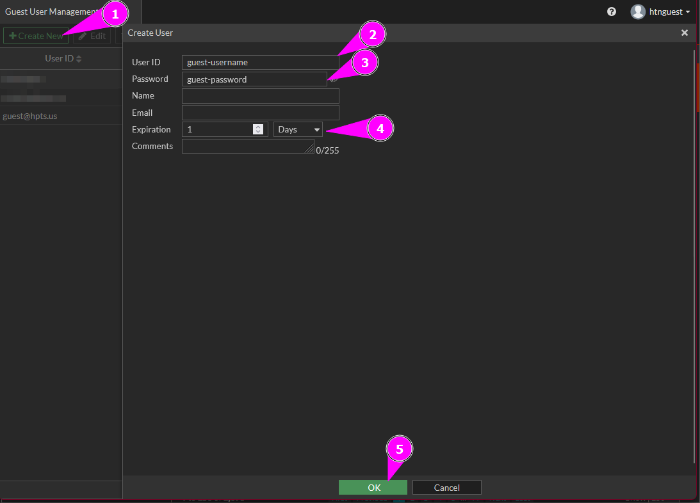
- Once logged in, click on +Create New in the upper left and enter the following:
- User ID: The guest user will need to know this - More than 1 person can use the same guest login (This is case sensitive to make it easy for your guests please use all lower case)
- Create a simple, but random, password. This helps to prevent the same password from being reused. There are websites which can help generate random words, if needed.
- Copy the password to the Comments section. If the password needs to be viewed in the future, this is the only way.
- Expiration: Adjust this as needed
- Click OK at the bottom of the screen
- Be sure to give the guest user their User ID and Password -
- If needed, select the user and double-click (or Edit) to change any of the user info
- The expiration timer will start after the guest's first login so you can create vouchers in advance if needed